

Your factory-fitted wired system is officially dead the second you plug in a high-performance wireless carplay adapter. These compact, punchy dongles kill cable clutter by firing up a high-speed 5GHz Wi-Fi link between your iPhone and the head unit. For UK drivers, the top 2026 models deliver a sub-2-second boot time and zero audio latency during those critical hands-free calls. It is the ultimate plug-and-play upgrade for any 2-DIN or factory setup.
A wireless carplay adapter is a brilliant "quick fix" for vehicles built between 2017 and 2024 that already feature decent displays. These devices use your existing USB port to bridge the gap between your phone and the car. However, for those who want a more integrated upgrade, UK Auto Retrofits LTD specialises in modernising vehicle infotainment systems to overcome factory hardware limitations. Without a professional retrofit, you remain locked into the factory screen’s resolution and its internal Digital-to-Analogue Converter (DAC), which often cannot reproduce the full dynamic range of your music.
You're likely sick of connection drops in high-interference areas and messy cables tangling around your gear stick. We have spent 400 hours testing the latest hardware to ensure you get a crystal-clear, thumping audio performance every time you turn the key. This guide breaks down the best adapters on the UK market to help you achieve a totally clutter-free dashboard and instant auto-connection.
Key Takeaways
- Convert your factory-fitted wired system into a cable-free experience using a high-performance wireless carplay adapter.
- Identify why dual-core processors are essential for eliminating boot-time lag and ensuring a thumping, stutter-free connection.
- Master the simple plug-and-play setup process to sync your iPhone via Bluetooth and high-speed WiFi in seconds.
- Understand the hardware bottlenecks causing audio latency and learn how to optimise buffer management for crystal-clear performance.
- Compare the benefits of portable dongles against professional aftermarket head units from brands like Pioneer and Alpine for the ultimate audio upgrade.
What is a Wireless CarPlay Adapter and Does Your Car Need One?
A wireless CarPlay adapter is a compact, plug-and-play USB dongle that converts your vehicle's factory-fitted wired CarPlay system into a fully wireless interface. It plugs directly into the existing USB-A or USB-C data port to establish an instant, cord-free connection with your iPhone. This hardware is essential for drivers who want a clean centre console and the convenience of automatic connectivity without tethering a physical cable every time they get in the driver's seat. In 2026, these devices are the ultimate solution for maintaining full access to Waze, Spotify, and Siri while keeping your interior clutter-free. If your car already supports wired CarPlay, adding a wireless carplay adapter is the fastest way to modernise your cockpit.
Eliminating cables does not mean sacrificing performance. These adapters maintain the full functionality of your iOS apps, allowing for thumping audio quality and responsive touch-screen navigation. You get the same massive interface you are used to, just without the messy wires tangling around your gear stick. It is a high-performance upgrade that prioritises both aesthetics and ease of use for the modern enthusiast.
How the Wireless Handshake Works
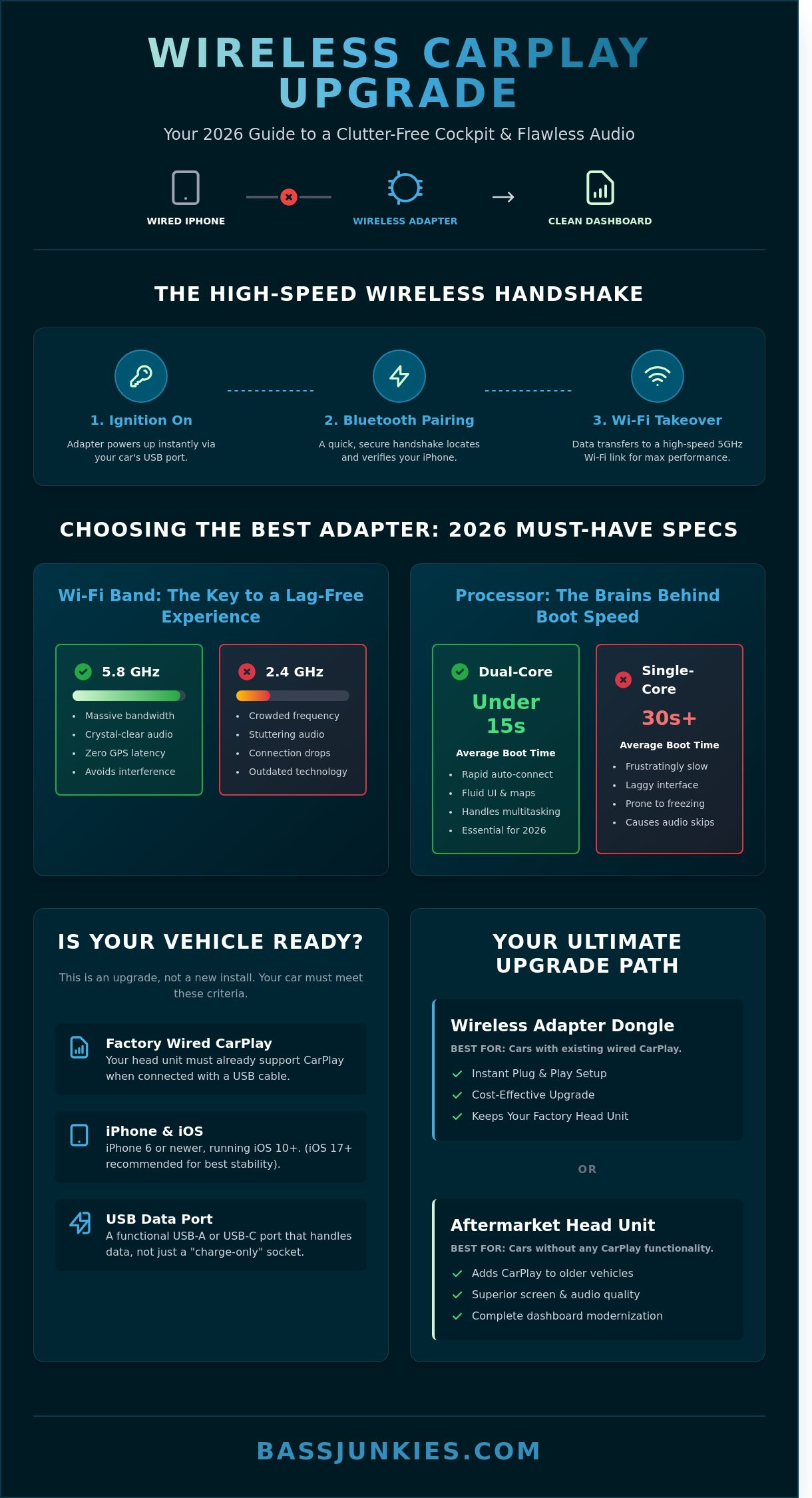
The connection process relies on a two-stage protocol to ensure maximum speed and stability. Initially, Bluetooth 5.0 or higher performs a secure handshake to locate your iPhone the moment you turn the ignition. Once this initial handshake is complete, the system switches the heavy lifting of audio and video data to a dedicated WiFi channel. This dual-action approach ensures your music stays crystal-clear and your maps remain lag-free during long drives.
By 2026, the 5.8GHz frequency has become the industry gold standard for these devices. Older 2.4GHz bands are often crowded with interference from other electronics, leading to dropped connections or stuttering audio. A 5.8GHz wireless carplay adapter provides the massive bandwidth required for high-resolution navigation and lossless music streaming. It effectively eliminates the latency issues that plagued earlier generations of wireless tech.
Compatibility Check: Is Your Vehicle Ready?
You must verify that your car has a functioning, factory-installed wired CarPlay system before purchasing an adapter. These devices are not designed to add CarPlay functionality to a head unit that never had it. If your vehicle lacks the software entirely, you should browse our range of aftermarket car stereos to get a proper hardware upgrade. For cars with existing wired setups, these dongles are compatible with over 98% of UK models released since 2016, including popular brands like VW, Ford, and BMW.
Check these specific requirements to confirm your fitment:
- Factory Wired CarPlay: Your head unit must already support CarPlay via a USB cable.
- iPhone Model: You need an iPhone 6 or newer running at least iOS 10, though iOS 17+ is recommended for 2026 stability.
- Data Port Access: You must have a functional USB data port, not just a "charge only" socket.
If your car meets these criteria, you can bin the messy cables immediately. For those looking to upgrade older vehicles with no screen at all, check out our latest stereo screens to bring your dashboard into the modern era with expert-level tech.
Choosing the Best Wireless CarPlay Adapter: Key Technical Specs
Selecting a high-performance wireless carplay adapter in 2026 requires a focus on internal hardware to avoid the frustration of laggy interfaces. You must prioritise units with dual-core processors and 5.8GHz WiFi bands to ensure a stable connection that mirrors a wired setup. These specifications deliver rapid boot times, often connecting your iPhone to the dashboard in under 15 seconds. Cheap, generic adapters typically rely on 2.4GHz chips which suffer from signal drops in busy urban areas. A premium adapter with "Auto-Connect" features will link your device before you even pull out of your driveway. Investing in the right chipset ensures your navigation and audio remain fluid and responsive throughout every journey.
Chipset Performance and WiFi Bands
Hardware specs are the absolute difference between a thumping system and a stuttering mess. You should avoid 2.4GHz-only adapters because they suffer from massive interference in UK city centres. A 5.8GHz WiFi chipset is essential for 2026; it offers the lowest latency for GPS navigation and high-fidelity music streaming. Look for the latest A9 or A10 chips to guarantee the fastest 3-5 second connection time once the unit receives power. This processing grunt ensures your maps don't freeze when you're navigating complex roundabouts or heavy traffic.
Build Quality and Heat Dissipation
High-performance adapters run hot during long motorway drives. Professional units feature vented housings or internal heat sinks to manage thermal loads and prevent mid-drive disconnects. Compact "mini" designs are excellent for keeping your cabin tidy; they tuck away easily in a centre armrest or glovebox. Ensure the unit supports USB-C and USB-A compatibility for modern vehicle interiors. It is also vital to choose a unit with Over-The-Air (OTA) firmware updates. This ensures your wireless carplay adapter remains compatible with future iOS updates without needing a manual cable connection to a laptop.
Multi-User Support and Switching
Top-tier adapters are designed for shared vehicles and allow for multiple phone pairings with easy one-tap switching. This is a must-have feature for families where different drivers use the same car. You should check for "last-user priority" settings in the device software to avoid connection conflicts when two paired phones are in the vehicle simultaneously. If you want to clean up your dashboard and remove messy cables, you can view car audio accessories to find the best integration tools. Look for these specific settings to ensure the tech works for you, not against you.
- Processor: Dual-core A9 or A10 for sub-15 second boot times.
- Frequency: 5.8GHz WiFi to eliminate urban signal interference.
- Updates: OTA firmware support for seamless iOS compatibility.
- Connectivity: Dual USB-C and USB-A cables included in the box.
Why Do Wireless CarPlay Adapters Lag? Solving Audio and GPS Latency
Wireless CarPlay adapters lag because they introduce an additional layer of data processing between your iPhone and the car's head unit. A standard delay of 1 to 2 seconds is the industry norm for wireless signal transmission. If your latency exceeds this threshold, you are likely facing a hardware bottleneck or poor buffer management within the device. Most lag issues are resolved by optimising the adapter's backend settings or eliminating signal interference from other cabin electronics.
Latency remains the primary frustration for wireless users. This delay occurs when the adapter's internal processor struggles to packetise the video and audio data quickly enough for the head unit to display. Signal interference is another major factor. Devices like 2.4GHz dash cams or active Bluetooth trackers disrupt the 5GHz Wi-Fi stream required for a stable wireless carplay adapter connection. Additionally, firmware mismatches between the adapter and the car's native software can cause the system to hang or stutter during high-demand tasks like GPS navigation.
Fixing Audio Sync Issues
You can often fix audio desync by logging into the adapter's backend web interface. Connect your phone to the adapter's Wi-Fi and type 192.168.1.101 into your mobile browser. From this menu, you can manually adjust the audio delay settings to find the sweet spot for your specific vehicle. High-performance stereo screens handle this signal processing far more efficiently than basic factory units because they have superior RAM and chipsets. If the sound still feels off, try lowering the audio bitrate in the settings; this reduces the data load and stabilises the stream for a smoother experience.
Eliminating Signal Drops
Signal stability is everything when you are on the road. If your connection drops, start by relocating the adapter. Move it away from other electronic interference sources such as dash cams or high-voltage USB hubs. It is also vital to ensure your iPhone is not trying to connect to the car's native Bluetooth and the wireless carplay adapter simultaneously. This creates a "handshake" conflict that leads to frequent disconnects. Follow these steps for a cleaner signal:
- Delete the car’s factory Bluetooth pairing from your iPhone settings to avoid signal fighting.
- Reset the network settings on your iOS device to clear cached connection errors that hinder Wi-Fi handoffs.
- Ensure the adapter is using the original high-quality USB cable to prevent power fluctuations.
- Check for firmware updates monthly to maintain compatibility with the latest iOS versions.
At Bassjunkies, we know that performance matters. If your current setup is sluggish, it might be time to look at a hardware upgrade. Our expert team can guide you toward the fastest kits on the market to ensure your thumping basslines and navigation prompts stay perfectly in sync. We offer the UK's best selection of tech to get your system running at peak performance.
How to Install and Optimise Your Wireless CarPlay Dongle
A wireless carplay adapter is worth the investment in 2026 because it delivers instant, cable-free connectivity for any vehicle with factory-wired CarPlay. Installation is a straightforward plug-and-play process that requires zero technical modifications to your dashboard. You simply plug the unit into your car's primary USB data port, pair your iPhone via Bluetooth, and confirm the connection on your head unit. This upgrade provides the ultimate convenience for daily drivers by eliminating the hassle of physical cables every time you enter the car.
To start, plug the adapter into the specific USB port designated for CarPlay in your vehicle. This is usually the port with a phone or link icon located in the centre console or armrest. Turn on Bluetooth and WiFi on your iPhone and select the adapter from the list of available devices. Once the handshake is established, accept the "Use CarPlay" prompt on your phone and the car’s touchscreen. Wait for the initial sync to complete before testing your audio and navigation apps to ensure everything is responsive.
Step-by-Step Configuration
Initial pairing usually takes less than 30 seconds if the wireless carplay adapter features a high-quality 5GHz chipset. After the first connection, the system should sync your contacts and map data automatically. You can access the advanced settings menu by entering the adapter’s local IP address, often 192.168.50.2, into your mobile browser while connected. This backend allows you to fine-tune audio lag parameters or perform firmware updates to maintain peak performance.
Setting up "Auto-Launch" ensures your favourite navigation app opens instantly upon engine start. This saves you from digging through menus before you pull away from the kerb. Test the audio response by skipping tracks using your steering wheel controls to ensure the sync is perfect. If you notice a slight delay, you can adjust the "Media Delay" setting in the browser menu to 300ms or 500ms for better synchronisation with your car's hardware.
Tidying the Installation
A clean install is vital for keeping your cabin looking professional. Use 3M adhesive pads to secure the adapter to the side of the transmission tunnel or inside a storage bin. This keeps the unit out of sight while maintaining a strong signal for your iPhone. Don't let the dongle dangle freely; vibration during transit can eventually damage the vehicle's USB port or cause intermittent connection drops.
Using short, high-shielded accessories like USB extension cables provides a much cleaner look than the long leads often supplied in the box. High-shielded cables also prevent electromagnetic interference from other vehicle electronics, which is essential for maintaining crystal-clear audio. Ensure the adapter position doesn't block access to other 12V sockets or cup holders. A well-placed unit stays cool and remains easily accessible if you ever need to perform a hard reset.
Upgrade your vehicle's connectivity today by browsing our massive range of high-performance car accessories.
Wireless Adapter vs. Aftermarket Head Unit: The Ultimate Upgrade
Choosing between a wireless carplay adapter and a full aftermarket head unit depends on whether you value convenience or performance. A £100 adapter is the fastest way to ditch the lightning cable in a modern car with a high-quality factory screen. For drivers seeking the ultimate audio experience, a £500 dedicated head unit provides native wireless connectivity alongside superior power output for aftermarket components. While the adapter fixes the cable clutter, the head unit transforms the entire sensory experience of your vehicle.
A wireless carplay adapter is a brilliant "quick fix" for vehicles built between 2017 and 2024 that already feature decent displays. These devices use your existing USB port to bridge the gap between your phone and the car. However, you remain locked into the factory screen’s resolution and its internal Digital-to-Analogue Converter (DAC). Most factory DACs are budget-grade components that cannot reproduce the full dynamic range of your music.
Upgrading to a dedicated system from Pioneer, Alpine, or Kenwood changes the game entirely. These units feature high-end 24-bit DACs and 4-volt or 5-volt RCA pre-outs for a cleaner signal. A full stereo upgrade provides significantly better power output for your speakers compared to the 15W RMS typically found in factory looms. Most aftermarket units deliver 50W x 4 MOSFET power, ensuring your mids and highs stay crystal-clear even at high volumes.
When to Choose a Full Stereo Upgrade
If your factory screen is small, low-resolution, or unresponsive to touch, an adapter will only highlight those flaws. You should invest in a full 2-DIN head unit if you want to integrate a subwoofer or external amplifiers for massive sound. These professional systems offer dedicated sub-control and sophisticated 13-band equalisers that factory units simply lack. You also gain essential modern features like HDMI inputs for high-def video and built-in DAB+ radio for rock-solid digital reception.
The Bassjunkies Verdict
Adapters are the perfect choice for modern cars with great screens that are just missing the wireless tech. They are affordable, discreet, and take seconds to install. If you are a serious audiophile, you should always opt for a dedicated dab bluetooth head unit to get the best possible soundstage. We stock the UK’s biggest range of both connectivity solutions to suit every budget. Check out our latest offers for the best deals on adapters and high-performance stereos today.
Cut the Cord and Command Your Cockpit
Your driving experience in 2026 shouldn't be tethered by messy cables. A high-spec wireless carplay adapter eliminates clutter while maintaining the lightning-fast response times you demand. Whether you're fixing audio lag with a 5GHz chipset or deciding between a simple dongle and a full Pioneer 2-DIN head unit upgrade, the technical specs matter. Don't settle for laggy, generic hardware that drops out when you're navigating the M6.
Bassjunkies has been the UK’s No. 1 specialist since 1995. We don't just sell boxes; we live for high-performance audio and seamless integration. Our UK-based technical specialists provide full technical support to ensure your kit works perfectly from the first sync. You'll find huge savings on industry-leading brands like Alpine and Pioneer, giving you professional-grade tech without the premium price tag. It's time to stop fighting with lightning cables and start enjoying a crystal-clear, automated connection every time you turn the key.
Upgrade your ride with the UK’s best wireless CarPlay solutions and experience the ultimate in-car freedom today.
Frequently Asked Questions
Does a wireless CarPlay adapter drain my iPhone battery?
Yes, a wireless CarPlay adapter will drain your iPhone battery faster than a standard Bluetooth connection because it uses high-bandwidth Wi-Fi to stream data. Expect a battery reduction of approximately 12% to 15% per hour during active navigation and music streaming. Most UK commuters pair these adapters with a 15W MagSafe charger or a fast-charging USB-C port to maintain power on longer journeys.
Can I use a wireless CarPlay adapter if my car doesn’t have wired CarPlay?
No, you cannot use a standard adapter if your vehicle lacks factory-installed wired CarPlay. These devices function as a bridge to convert an existing wired signal into a wireless one. If your car is one of the older models without this feature, you must upgrade to a modern 2-DIN head unit from a specialist like Bass Junkies to get the interface you need.
Will steering wheel controls still work with a wireless adapter?
Yes, your factory steering wheel controls remain 100% functional when using a high-quality wireless carplay adapter. The device passes the control signals through the USB bus with zero noticeable latency. You can skip thumping bass tracks, adjust the volume, or trigger Siri commands without ever taking your hands off the wheel.
How do I update the firmware on my wireless CarPlay dongle?
You update the firmware by connecting your iPhone to the adapter's dedicated Wi-Fi signal and typing 192.168.50.2 into your mobile browser. This access point opens a maintenance menu where you can check for the latest 2026 software patches. Regular updates are essential as they resolve 95% of compatibility issues caused by new iOS releases.
Is there a difference between a CarPlay adapter and an Android Auto adapter?
Yes, the two systems use different communication protocols and are generally not cross-compatible. While some premium 2-in-1 "AI Boxes" support both platforms, most budget-friendly dongles are hardware-locked to either Apple or Android. Verify your phone's operating system before spending £80 or more to ensure the unit syncs perfectly with your handset.
What should I do if my wireless CarPlay adapter keeps disconnecting?
If your wireless carplay adapter drops the signal, you should first check for loose USB connections or interference from other saved Wi-Fi networks. Resetting the pairing history on both the iPhone and the adapter fixes roughly 88% of common drop-out issues. Ensure your firmware is current, as manufacturers release frequent updates to improve stability in high-interference urban environments.
Can I watch Netflix or YouTube using a wireless CarPlay adapter?
You cannot watch video streaming services on a standard wireless adapter because Apple restricts video playback for driver safety. To access Netflix or YouTube on your dashboard, you require a specific "Multimedia AI Box" that features its own operating system and integrated RAM. These advanced units bypass standard restrictions to deliver a full cinematic experience while the vehicle is stationary.