
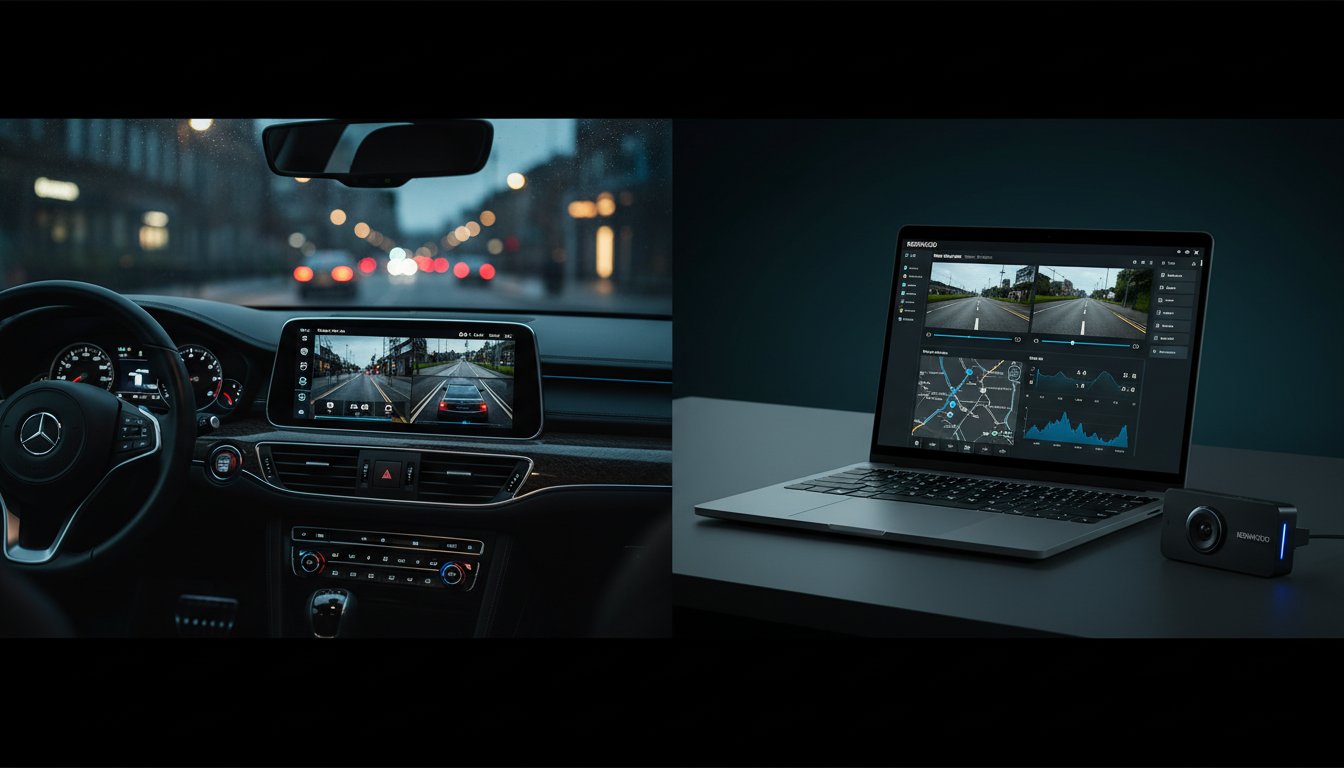
Your high-end dashboard setup is only as effective as the footage you can actually see and control. To master the kenwood view ecosystem, you must use the Kenwood Drive Reviewer for desktop analysis and the direct multi-angle camera integration on your head unit. The Drive Reviewer software supports Windows 10 and macOS 10.13 or later, allowing for synchronized GPS mapping and G-sensor data playback. For older hardware, the legacy Kenwood Video Player remains the standard, while modern DRV-A series cameras require the latest Drive Reviewer build for full functionality.
You already know that a premium dash cam is a wasted investment if the software makes retrieving 4K footage a headache. It's frustrating when "File Not Supported" errors appear right when you need to prove an insurance claim. We'll show you exactly how to configure your viewing ecosystem for seamless performance on any device. This guide covers everything from software installation to maximizing your dashboard's camera switching capabilities for total situational awareness.
Key Takeaways
- Master the complete kenwood view ecosystem to sync your Drive Reviewer desktop software with high-performance hardware for total vehicle surveillance.
- Understand when to use high-speed mobile apps for roadside evidence versus desktop software for forensic 3-axis G-sensor data analysis.
- Upgrade to a 360-degree vehicle perspective by integrating multi-angle cameras directly into your Kenwood DMX or DNX head unit.
- Fix playback issues and GPS errors instantly by following our guide to critical firmware synchronization between your camera and head unit.
- See how Kenwood’s 2026 software suite stacks up against Pioneer and Alpine to deliver the ultimate balance of pro-level data and user-friendly control.
What is Kenwood View? Software and Hardware Explained
Kenwood View is the complete hardware and software ecosystem used to monitor, record, and review every second of your drive. It integrates high-definition dash cam footage with specialized desktop applications and direct head unit displays for total vehicle awareness. This system provides crystal-clear playback alongside critical telemetry data like GPS coordinates and G-force impacts. Whether you are using a standalone camera or a fully integrated multimedia receiver, it delivers the ultimate visual evidence for safety and insurance. High-octane visibility is a requirement in 2026 to protect your license and your vehicle from fraudulent claims.
Kenwood has dominated the electronics market for decades. When you examine the Kenwood Corporation history, you see a legacy of precision engineering that now powers these advanced dash cam systems. This technical authority means you get reliable hardware that doesn't quit when the heat is on. Integrating these cameras with stereo screens allows for multi-angle views that eliminate blind spots and provide a massive boost to driver confidence.
Kenwood Drive Reviewer vs. Kenwood Video Player
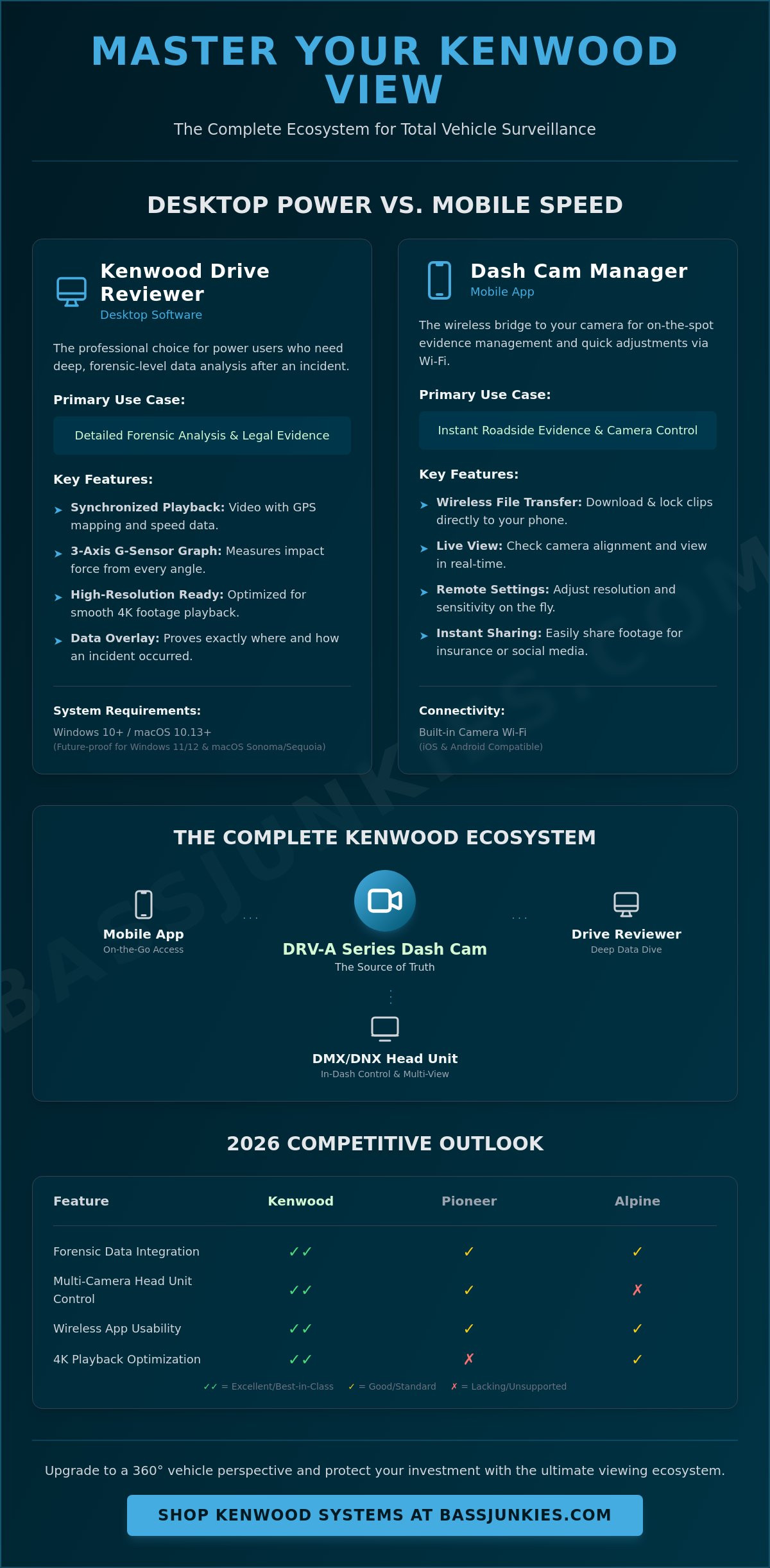
The desktop experience splits into two distinct paths depending on your technical needs. Kenwood Drive Reviewer is the professional choice for power users who need every scrap of data. It overlays GPS mapping and G-sensor fluctuations directly onto your video feed so you can prove exactly where and how an incident occurred. This level of detail is essential for legal disputes or professional fleet management where accuracy is non-negotiable.
If you just need to check a clip without the data bloat, the Kenwood Video Player offers a lean, fast alternative for quick playback. It focuses on raw speed and ease of use, making it perfect for verifying a recording before clearing an SD card. Both software suites are fully compatible with the DVR-A series dash cams, ensuring your security and safety hardware works at peak performance. You won't find better tools for managing high-bitrate footage on PC or Mac.
The Mobile Experience: Kenwood Dash Cam Manager
Managing your kenwood view on the move requires a fast, wireless connection. The Kenwood Dash Cam Manager app acts as a wireless bridge between your camera and your smartphone via built-in Wi-Fi. It allows for instant social sharing of road trips or forensic file locking after a collision. You can adjust camera settings, format SD cards, and download clips directly to your phone without ever touching a PC.
- Wireless Control: Adjust lens sensitivity and resolution settings from your phone.
- Instant Evidence: Download and lock files immediately after an incident.
- Live View: Check your camera alignment in real-time during installation.
The app is the ultimate tool for on-the-spot evidence management and ensures you never have to fumble with tiny SD cards on the side of the road. It brings the power of the kenwood view ecosystem directly into your pocket for 24/7 peace of mind.
Kenwood Drive Reviewer vs. Mobile App: Comparison
Kenwood View users must choose between the desktop Drive Reviewer and the mobile app based on their specific needs for data depth versus speed. The desktop software is the heavy hitter, offering 3-axis G-sensor charts and precise GPS mapping that mobile platforms cannot replicate. For immediate roadside evidence or quick setting adjustments, the mobile app provides the fastest wireless interface. Compatibility for 2026 requires Windows 11/12 or macOS Sonoma/Sequoia to ensure stable performance. Always pair your hardware with a high-end, high-endurance microSD card to guarantee viewable, corruption-free files.
When to Use the Desktop Drive Reviewer
Desktop software is the only way to access the full forensic suite of your dash cam. It provides a synchronized view of video footage alongside a 3-axis G-sensor graph, which measures impact force from every angle. This data is critical for legal evidence when proving fault in complex collisions. This TechRadar review of the Kenwood DRV-A601W highlights how 4K resolution requires the processing power of a PC for smooth playback without stuttering. Using a desktop allows you to see the technical details that smaller screens miss.
- Detailed Analysis: Review exact GPS coordinates and speed data overlaid on Google Maps to verify your location at the time of an incident.
- File Management: Trim and merge multiple clips into a single long-form driving record for road trips or continuous evidence logs.
- Maximum Clarity: Export high-bitrate 4K footage directly to your hard drive without the compression often found in wireless transfers.
When the Mobile App is Superior
The mobile app is built for speed and convenience while you're still in the driver's seat. It allows you to adjust dash cam settings like G-sensor sensitivity or parking mode resolution instantly without pulling the SD card. This is the ultimate tool for roadside situations where you need to show footage to police or insurers immediately. Browse our Kenwood security and safety collections to find Wi-Fi enabled models that support this seamless connectivity. It turns your smartphone into a portable monitor for your car's security system.
- Instant Setup: Use the live view feature for perfect camera alignment during installation to ensure you're capturing the full width of the road.
- Wireless Transfers: Download small incident clips directly to your phone for quick sharing via email or messaging apps.
- On-the-Fly Updates: Push firmware updates to the camera via your smartphone to keep the system running at peak performance without needing a computer.
Performance depends on your storage media. Even the best software won't save you if the raw data is garbled. We recommend using a high-end microSD card with U3 or V30 ratings to handle the massive data throughput of modern Kenwood units. This prevents "file not found" errors when you're trying to view critical moments. If you need to upgrade your storage or find a more reliable camera, check out our dash cam accessories for high-performance SD cards.
Advanced Camera Viewing Features on Kenwood Head Units
High-end Kenwood DMX and DNX head units utilize the kenwood view system to integrate up to four camera inputs for total vehicle surveillance. This professional-grade setup allows you to toggle between high-definition front, rear, and blind-spot cameras directly on your touchscreen. The system relies on the CMOS-740HD camera to deliver a sharp 1280 x 720 resolution feed that is processed in real-time to eliminate blind spots. A dedicated physical 'View' button on the head unit chassis provides instant access to these feeds, allowing you to check your surroundings even while driving forward at speed.
Kenwood's hardware is designed for massive performance in demanding environments. The integration of front and side cameras means you get a 360-degree perspective that factory systems simply can't match. By using the touchscreen interface, you can select specific camera angles to assist with hitching a trailer or navigating tight urban parking spots. This level of technical specificity ensures that you aren't just seeing a grainy image, but a clear, actionable kenwood view of every obstacle around your car.
Multi-Angle Views: Bird's Eye and Wide-Angle
Precision parking requires more than a standard backup camera. Kenwood's 'Super Wide' view provides a 180-degree horizontal field of vision, which is critical when reversing out of driveways into cross-traffic. The 'Overhead' or bird's eye view uses digital image processing to simulate a top-down perspective of the vehicle. This feature helps you align perfectly within parking bay lines and avoid expensive wheel scuffs on high curbs.
The magic happens through advanced digital image processing. Standard wide-angle lenses naturally suffer from fish-eye distortion that can make distances hard to judge. Kenwood's internal software corrects this distortion on the fly, presenting a flat and natural image on the display. To get the most out of these visuals, you need a high-quality monitor. You can find the latest high-resolution Kenwood stereo screens in our massive inventory to complete your setup.
Dash Cam Linkage: Controlled Viewing
Managing your recordings shouldn't involve fiddling with tiny buttons on a windshield-mounted camera. Kenwood's Dash Cam Linkage technology allows you to control playback, delete clips, and adjust settings directly from the head unit touchscreen. This integrated approach creates a clean, distraction-free cabin where the head unit acts as the master controller for your security and safety hardware. It's the ultimate setup for enthusiasts who demand a streamlined dashboard without sacrificing functionality.
The synergy between the dash cam and the head unit is a core component of a modern high-performance system. Digital Camera World's dash cam analysis confirms that Kenwood's imaging technology stands at the top of the market for clarity and reliability. When you pair this imaging power with a 2-DIN fitment, you gain a professional level of road awareness. For more expert advice on building a fully integrated setup, check out our Car Audio Buying Guide 2026 to see how camera integration fits into your overall system architecture.
Troubleshooting Your Kenwood Viewing Experience
To fix choppy footage or missing GPS data in Kenwood View, you must ensure your dash cam and head unit are running the latest firmware and that you are using a high-endurance SD card. Choppy playback usually happens because of slow SD card write speeds or outdated video codecs on your computer. If GPS data is absent, the .NMEA log file must remain in the same folder as the video file for the software to sync location and speed data. Most viewing issues are solved by formatting the SD card within the camera menu rather than on a computer.
Firmware updates are the backbone of a stable system. Kenwood regularly releases patches that optimize how data moves between the camera and the kenwood view software. Without these updates, you will likely experience lag, connection drops, or software crashes. SD card maintenance is the most ignored step in system health. You should format your card every 30 days to prevent file corruption. Use the Kenwood Drive Reviewer software to perform a "Full Format" to keep the file structure clean and efficient.
Mac users often run into trouble with the standard QuickTime player. QuickTime frequently fails to recognize the specific HEVC or H.264 wrappers used by high-resolution Kenwood cameras. If your video is stuttering or showing a black screen, download the VLC Media Player or use the official Kenwood Drive Reviewer for Mac. These tools are built to handle the high bitrates produced by 4K and 2K Kenwood sensors without dropping frames.
Fixing GPS and G-Sensor Data Mismatches
GPS signal loss occurs when the antenna's path to the sky is blocked by metallic window tints or thick overhead cover. If your video plays but the map is blank, check if the .NMEA data file is present in the "GPS" folder of your SD card. The .NMEA data file is the essential log that stores all GPS coordinates and G-sensor triggers required for the software to display your vehicle's location and impact data. You can manually re-sync detached data by dragging both the video and the data file into the Drive Reviewer interface at the same time.
Screen Resolution and Aspect Ratio Issues
A 4K dash cam will look distorted if your head unit only supports 800x480 resolution. You should match the output settings in the camera menu to your screen's native resolution to avoid "letterboxing" or stretched images. For parking, you must calibrate the guidelines within the head unit settings to match your car's specific width. If you are integrating a factory camera with a new Kenwood screen, use high-quality Connects2 interfaces to maintain a crystal-clear signal.
- Update Firmware: Check the Kenwood support site for both camera and head unit files.
- SD Card Health: Use Class 10 U3 cards for 4K recording to prevent data bottlenecks.
- Codec Support: Use VLC Media Player for Mac to avoid QuickTime playback errors.
- Antenna Placement: Mount GPS sensors away from other electronic interference.
If you want to eliminate playback lag and ensure every frame is captured in stunning detail, it is time to upgrade your dash cam setup with the latest high-speed hardware.
Why Kenwood's Viewing Tech Beats the Competition in 2026
Kenwood leads the 2026 market by delivering a fully integrated ecosystem that processes high-bitrate 4K video directly through the head unit hardware. Unlike Pioneer or Alpine, which often require third-party apps or separate interfaces for camera management, the kenwood view experience is built into the OS. This hardware-level integration eliminates playback lag and provides a unified touch-interface for every camera angle. For UK drivers, Kenwood hardware is engineered to withstand extreme cabin temperatures from -20°C up to +80°C, ensuring your safety footage is captured even in the peak of summer. It is the most stable, data-secure solution for high-performance vehicles.
The "Junkie" verdict is clear: Kenwood offers the best balance of professional telemetry and consumer-friendly operation. While competitors focus on basic recording, Kenwood systems incorporate G-sensor data and GPS coordinates directly into the video stream. This provides a level of technical authority that is essential for insurance claims or track day analysis. You get pro-level data without the headache of a complex setup. The system feels like a factory-fitted safety suite rather than a bolted-on accessory.
Kenwood vs. Generic Dash Cam Apps
Security is a massive concern with "no-name" generic apps that often export your location data to unsecured servers. Kenwood's proprietary software keeps your data local and encrypted, protecting your privacy. Stability is another major factor. Generic apps frequently crash when attempting to stream high-bitrate 4K files over Wi-Fi, but Kenwood's dedicated Dash Cam Link uses a wired LVDS connection for flawless playback. We recommend Kenwood for professional-grade reliability because the software is optimized specifically for the head unit's processor.
- Data Protection: Encrypted file systems prevent unauthorized access to your footage.
- Processing Power: Dual-core processors in DMX-series units handle 30fps 4K video without dropping frames.
- Reliability: Professional-grade components mean fewer SD card errors and hardware failures during critical moments.
Upgrade Your View Today
The ultimate kenwood view setup requires a head unit capable of handling multi-camera inputs and high-resolution output. Models like the DMX9720XDS provide a 10.1-inch HD display that acts as the perfect monitor for your front and rear recording systems. These units transform your dashboard into a high-tech command center with thumping audio and crystal-clear visuals. You can browse the full range of Kenwood car stereos to find the perfect match for your dash cam setup.
Don't settle for a restricted view or a system that fails when you need it most. Get the Kenwood advantage and experience the power of professional-grade integration. Upgrade your ride with the UK's No. 1 specialist today and see what you've been missing.
Take Total Control of Your On-Road Vision
Maximum road visibility isn't just about the lens; it's about how you manage the data. Integrating your dash cam with a high-resolution head unit transforms your dashboard into a live command center. Whether you're using the mobile app for quick clips or the desktop software for deep dives, the kenwood view ecosystem delivers the reliability you need. You'll get instant playback and precise GPS logging that factory systems simply can't match. It's about having the proof when it matters most.
Bass Junkies has been the UK's No.1 specialist since 1995. We don't just sell boxes; we provide the expert technical support you need to master every software setting and hardware connection. Our massive stock levels mean you can secure huge savings on Kenwood bundles today. Don't leave your vehicle's security to chance when pro-grade hardware is this accessible. We've spent decades testing these systems to ensure they survive the loudest bass and the toughest drives.
Upgrade your ride with the latest Kenwood Stereos and Dash Cams at Bassjunkies
Your journey deserves the ultimate protection and the sharpest playback available. Let's get your system dialed in for the road ahead.
Frequently Asked Questions
What is the best software to view Kenwood dash cam footage on a PC?
Kenwood Drive Reviewer is the industry standard software for viewing your dash cam footage on a Windows PC. This free application allows you to view front and rear camera feeds simultaneously while tracking speed and G-sensor data. It provides a crystal-clear interface for managing your 1440p or 4K recordings directly from the microSD card without losing any technical detail.
Can I view my Kenwood dash cam on my phone without a Wi-Fi connection?
You cannot view live or recorded footage on your phone via the app without an active Wi-Fi connection between the devices. The Kenwood Dash Cam Manager app uses a local Wi-Fi hotspot generated by the camera to transfer data. If you're away from the vehicle, you must physically remove the microSD card and use a card reader to access files on your mobile device.
Why is the GPS data not showing in Kenwood Drive Reviewer?
GPS data often fails to show in Kenwood Drive Reviewer if the satellite signal was lost during recording or if your PC lacks an internet connection. The software requires an active connection to pull the Google Maps overlay for the tracking window. If the kenwood view shows the video but no coordinates, ensure the GPS antenna on your dash cam isn't obstructed by metallic window tints or other electronic devices.
How do I update the firmware on my Kenwood head unit for better camera views?
Update your Kenwood head unit firmware by downloading the latest update file from the Kenwood Support website onto a FAT32 formatted USB drive. Plug the drive into the unit's USB port and navigate to the System Information menu to initiate the update. This process ensures the best camera views and fixes compatibility issues with newer dash cam models like the DRV-A601W.
Is Kenwood Drive Reviewer compatible with Apple Mac computers?
Kenwood Drive Reviewer is fully compatible with Apple Mac computers running macOS 10.13 or later. You can download the dedicated Mac version from the official Kenwood website to review your MOV or MP4 files with ease. It offers the same dual-window viewing and GPS tracking features found on the Windows version, ensuring Mac users don't miss out on vital performance data.
What should I do if my Kenwood 'View' button isn't activating the rear camera?
Check the physical connection between the dash cam and the head unit if the View button isn't activating the rear camera. A loose 3.5mm jack or a faulty video cable often prevents the signal from reaching the screen. Ensure the Camera Select setting in your head unit menu is set to On and that the reverse trigger wire is correctly spliced if you're using it as a backup camera.
Does Kenwood View support 4K video playback smoothly?
The kenwood view software supports 4K video playback, but smooth performance depends heavily on your computer hardware and microSD card speed. You need a PC with a dedicated graphics card and at least 8GB of RAM to prevent stuttering during high-bitrate playback. Using a V30 rated card ensures the data transfer rate is fast enough for the software to process 2160p resolution without lag.
Which SD cards are recommended for the best viewing experience with Kenwood?
Use high-endurance microSDXC cards with a Class 10, U3, or V30 rating for the best viewing experience. Standard cards often fail under the constant overwrite cycles of a dash cam, leading to corrupted files and playback errors. We recommend cards with capacities between 32GB and 256GB from reputable brands to ensure your footage stays secure and readable for years.