

Your factory infotainment system is a relic that's holding your audio experience hostage. Apple car play is the industry standard for smartphone integration, mirroring your iPhone onto a high-performance 2-DIN head unit for seamless navigation and studio-grade audio control. You can retrofit this tech into any vehicle using a vehicle-specific fascia kit and a plug-and-play wiring interface to eliminate messy phone mounts forever.
We know you're tired of flat, lifeless sound from stock components that can't handle modern bitrates. As the UK’s No. 1 specialist, we're providing an immediate expert breakdown of how the system works, which MOSFET-powered head units deliver the loudest output, and the exact steps to install them. This guide covers everything from hardware selection to high-voltage pre-outs to ensure your 2026 tech upgrade delivers a massive performance boost.
Key Takeaways
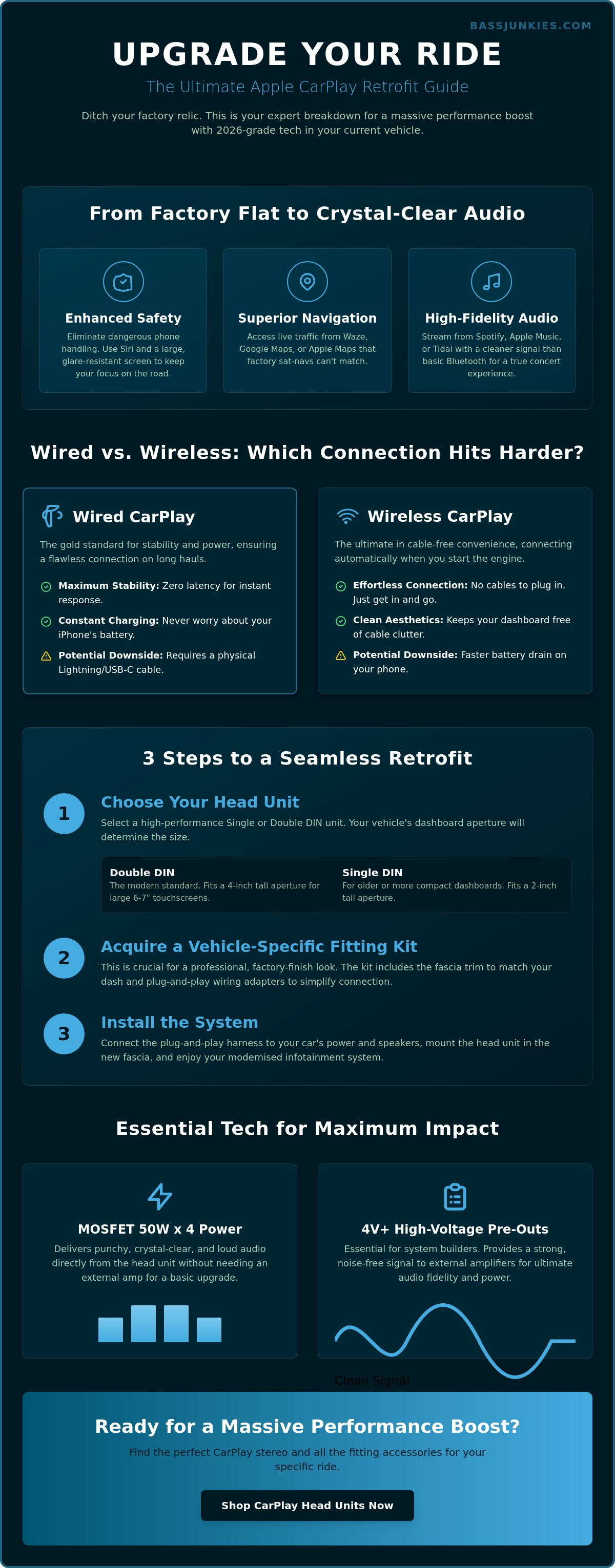
- Learn how to retrofit Apple car play to virtually any vehicle using high-performance Single or Double DIN head units.
- Discover why 4V+ high-voltage pre-outs and MOSFET 50W x 4 internal power are essential for achieving a punchy, crystal-clear audio signal.
- Understand the technical trade-offs between the convenience of wireless connectivity and the low-latency stability of a wired connection.
- Identify the best CarPlay-optimised apps for the UK roads, including Waze for community-based traffic alerts and Spotify for high-fidelity playback.
- Determine your specific dashboard aperture requirements to ensure a seamless, professional-grade installation in your current car.
What is Apple CarPlay and How Does it Work?
Apple CarPlay is a high-performance interface protocol that mirrors your iPhone directly onto your vehicle's dashboard display. It provides instant, safe access to navigation, music, and messaging apps while you are behind the wheel. You control the interface using Siri voice commands, the car’s touchscreen, or physical rotary knobs. To run the system, you need an iPhone 5 or later and a compatible head unit. This technology replaces clunky factory software with a fluid, responsive Apple environment designed specifically for driving.
The system works by establishing a secure data link between your phone and the car. When you connect, the phone handles the heavy processing while the car’s screen acts as the visual output. If you want to dive deeper into the technical history, What is Apple CarPlay provides a full breakdown of its evolution since 2014. For most UK drivers, it is the ultimate upgrade to modernise an older vehicle or enhance a new one. It ensures your focus stays on the road while your tech works in the background.
The Benefits of a Dedicated CarPlay Interface
Installing a car play compatible system eliminates the dangerous habit of handling your phone while driving. You get a high-resolution, glare-resistant screen that is far easier to read than a mobile perched on a vent mount. Safety is the priority here, but the performance boost is just as massive. You can run real-time navigation via Apple Maps, Google Maps, or Waze with live traffic updates that factory sat-navs often miss.
Audio quality is another huge win for enthusiasts. You get seamless integration with Spotify, Apple Music, and Tidal for high-fidelity streaming. This setup bypasses the limitations of basic Bluetooth, offering a cleaner signal for your car speakers. It turns your commute into a front-row concert experience with crystal-clear playback and easy-to-use controls.
Wired vs Wireless CarPlay: The Basics
Wired connections remain the gold standard for many because they use a Lightning or USB-C cable to handle both data and charging. This setup is incredibly stable and ensures your phone battery stays topped up during long motorway hauls. It is the go-to choice if you want zero latency and maximum reliability. Most budget-friendly 2-DIN units focus on this wired connection to keep costs down while delivering top-tier performance.
Wireless car play uses a combination of Bluetooth and 5GHz Wi-Fi to create a cable-free experience. It is the ultimate convenience; the interface pops up on your screen the moment you start the engine. The trade-off is a faster drain on your phone's battery since the Wi-Fi chip is working overtime. Many drivers pair wireless units with a separate wireless charging pad to get the best of both worlds without the cable clutter.
Can I Add Apple CarPlay to My Current Car?
Yes, you can add Apple CarPlay to almost any vehicle currently on UK roads. Retrofitting involves installing an aftermarket head unit that replaces your existing factory radio. This process works for both older cars with basic stereos and newer vehicles with integrated displays. You'll need a vehicle-specific fitting kit to ensure a professional, factory-finish look. These kits include the fascia trim and wiring adapters required for a seamless install. Upgrading is the most cost-effective way to get modern car play features without the massive price tag of a new vehicle.
The aftermarket industry has evolved rapidly to support nearly every make and model. Whether you drive a 20-year-old hatchback or a 2018 saloon, there's a solution available. High-quality head units from brands like Alpine, Kenwood, and Sony offer crystal-clear displays and lightning-fast response times. These units act as the ultimate hub for your smartphone, bringing navigation and entertainment to your dashboard. Bass Junkies provides expert advice to help you select the exact hardware needed for your specific dashboard configuration.
Installation is straightforward for those with basic technical skills, though professional fitting is always an option. You'll primarily be dealing with plug-and-play harnesses that connect the new unit to your car's power and speakers. When choosing your unit, consider how you'll connect your iPhone. Some budget units require a USB cable, while premium models offer a cable-free experience. Reviewing the Wired vs. Wireless CarPlay breakdown helps determine which hardware fits your daily commute.
Double DIN vs Single DIN Upgrades
Double DIN units are the industry standard for a modern, integrated look. These 4-inch tall apertures accommodate massive 6-7 inch touchscreens that make navigating car play effortless. They provide a thumping visual impact and plenty of room for touch controls. If your dashboard only has a 2-inch Single DIN slot, you aren't left behind. Modern "floating" displays mount a large screen in front of the dash, giving you a tablet-like experience in a vintage vehicle. You can explore the UK's biggest range by checking our collection of stereo screens for every fitment type.
Keeping Your Steering Wheel Controls
Losing factory functionality is a common concern for many enthusiasts, but it's easily solved. You can use Connects2 interfaces to bridge the gap between your new stereo and the original wiring loom. These plug-and-play kits allow you to maintain volume control and track skipping directly from your steering wheel. They also integrate factory reversing cameras into the new display, ensuring you don't lose any safety features. You can find more technical details on building the ultimate setup in our Car Audio Buying Guide 2026.
- Single DIN: 2 inches tall, often found in older or classic cars.
- Double DIN: 4 inches tall, the standard for modern touchscreen units.
- Fascia Kits: Essential plastic surrounds that match your car's dashboard texture and colour.
- CAN-bus Adapters: Technical interfaces that translate car data for the new head unit.
Upgrading your in-car tech shouldn't feel like a compromise. With the right fitting kit, your new screen will look like it rolled off the assembly line yesterday. If you're ready to transform your driving experience, browse our latest range of Apple CarPlay head units to find your perfect match.
Wired vs Wireless CarPlay: Which Connection Hits Harder?
Wired car play connections deliver the ultimate stability and audio fidelity for long-haul driving and high-performance sound systems. Wireless car play provides maximum convenience for short commutes by connecting your iPhone automatically via a 5GHz Wi-Fi band. While wireless setups offer a cleaner dashboard look, they are more power-intensive and typically cost £50 to £150 more than wired-only head units. Wired connections ensure your battery stays charged and provide zero-latency performance for navigation and high-bitrate music streaming.
Audio Fidelity and Connection Stability
Enthusiasts who demand thumping bass and crystal-clear highs always lean toward a wired connection. A physical USB-C or Lightning tether provides a massive data pipe that handles high-bitrate audio without the compression sometimes found in wireless streams. This hardware link eliminates the lag that can desync audio and video during playback.
Wireless units use a 5GHz Wi-Fi connection to maintain high bandwidth, but they aren't bulletproof. In high-density areas like central London or Birmingham, external interference can cause occasional signal drops or stuttering. MacStories' in-depth review of the latest CarPlay features confirms that while 2026 software is more resilient, the physical copper connection still wins for raw reliability. If you are running a high-end system with external amplifiers and upgraded speakers, the wired path ensures your signal remains pure.
Choosing Based on Your Driving Style
Your choice depends on how you use your vehicle every day. Short commutes benefit from the "get in and go" nature of wireless units. There is no faffing with cables for a ten-minute drive to the office. The system simply wakes up and starts your playlist before you’ve cleared the driveway.
Long-distance drivers and road-trip junkies should prioritise wired units or wireless models paired with high-speed charging ports. Wireless data transfer generates heat and drains battery fast, which can lead to your iPhone throttling performance on a three-hour motorway run. A wired 2-DIN head unit with DAB+ integration keeps your phone topped up while delivering a rock-solid connection. Check our latest offers to see the best deals on both connection types today.
Must-Have CarPlay Apps for Music and Navigation
The best car play apps for UK drivers focus on real-time road intelligence, high-fidelity audio, and hands-free safety. Waze is the essential choice for community-driven traffic alerts and speed trap warnings. Spotify and Apple Music provide the best CarPlay-optimised interfaces for managing massive libraries at speed. For communication, WhatsApp and Apple Messages integrate with Siri for full voice-to-text functionality. EV owners should prioritise Zap-Map or PlugShare to locate the 50,000+ public charging points across the UK network.
Optimising Your Audio Experience
High-end sound requires high-quality sources. Switch to Tidal or Apple Music to access "Lossless" audio streams that deliver 24-bit/48kHz resolution to your head unit. Standard streaming often compresses files; this strips away the punch from your mid-bass. You must adjust the EQ settings within your specific music app to account for the acoustic environment of your cabin.
This ensures your car speakers aren't struggling with muddy frequencies or distorted highs. CarPlay manages Siri interruptions by dipping the music volume during notifications. You can toggle "Announce Messages" in your iPhone settings to control how often your thumping tracks are paused for incoming texts. Expertly tuned audio settings make the difference between a standard commute and a front-row concert experience.
Navigation Beyond Apple Maps
Waze remains the enthusiast's top pick because it relies on 140 million active users to report road hazards, police presence, and potholes in real-time. It's faster than standard sat-navs at rerouting around M25 closures or local congestion. Google Maps is the superior backup for rural areas with poor 5G signal. Its offline download feature allows you to navigate 1,000-square-mile areas without a live data connection.
You can customise your car play dashboard by long-pressing icons on your iPhone screen. Move your most-used navigation and media apps to the first page for quicker access. A clean layout reduces screen-time and keeps your focus on the road. Most modern 2-DIN units allow for split-screen views, showing your map and current track simultaneously. This layout provides all the data you need without diving into sub-menus while driving.
Communication apps like WhatsApp use Siri to read messages aloud and dictate replies. This keeps your hands on the wheel while maintaining a 100% legal connection. For electric vehicle drivers, Zap-Map is the gold standard in Britain. It provides live status updates for chargers, ensuring you don't arrive at a broken or occupied station. Using these specialist tools turns your head unit into a high-performance command centre.
How to Choose the Best CarPlay Stereo for Your Ride
Choosing the best car play head unit requires focusing on three core pillars: audio output quality, screen responsiveness, and signal stability. Prioritise units with 4V or higher pre-outs to ensure a clean, distortion-free signal to your amplifiers. Select a capacitive touchscreen for smartphone-like fluidity and ensure the unit features MOSFET 50W x 4 internal power for punchy sound without needing external hardware. Always opt for a model with integrated DAB+ to future-proof your digital radio access across the UK.
Technical specifications define the performance of your upgrade. High-voltage pre-outs are essential for any serious build; 4V outputs provide a stronger signal-to-noise ratio than standard 2V units, meaning your music stays crystal-clear even at high volumes. If you aren't planning on adding an external amp immediately, look for MOSFET 50W x 4 internal power. This technology provides high-speed switching and thermal stability, delivering a thumping response directly to your car speakers.
Screen technology is another critical factor. Avoid resistive screens that rely on physical pressure. Capacitive touchscreens use the electrical properties of your skin, offering the same rapid response you expect from a modern iPhone. You should also ensure the unit includes a DAB+ tuner. Digital radio is the standard for UK broadcasting, and units with DAB+ integration offer more stations and better reception than old-school FM tuners.
Top Brands: Pioneer, Alpine, and Kenwood
Pioneer remains a dominant force for users who love customisation. Their Z-Series models are legendary for audio quality and allow you to tweak the interface to match your dash lighting perfectly. Alpine is the go-to choice for audiophiles who demand the cleanest signal processing and high-end DACs. If you need a reliable all-rounder, Kenwood offers fantastic hardware with the added bonus of Garmin-based navigation on select models, providing a solid backup if your phone loses signal. You can view double DIN head units from these top brands to find your perfect match.
The Importance of Professional Fitting
Expert installation is the only way to avoid DIY disasters like parasitic battery drain or damaged trim panels. Modern UK vehicles feature complex CAN bus wiring that requires specific interfaces to retain steering wheel controls and factory cameras. Beyond the wiring, professional installers can apply sound treatment to your doors. Learn why Sound Deadening is the essential foundation for any new stereo to stop rattles and improve mid-bass response. If you are unsure about the process, check our professional car audio installation guide for what to expect during a specialist fitment. Professional fitting ensures your car play system works flawlessly from day one.
Lock In Your Next-Gen Dash Upgrade
Upgrading your vehicle with a modern head unit is the most effective way to bring 2026 tech to your current ride. You can easily add car play to almost any car using a high-quality 2-DIN fitting kit and a premium receiver. Choosing between the lag-free performance of a wired connection or the seamless freedom of a wireless setup depends on your daily driving habits; both options deliver crystal-clear audio and lightning-fast navigation.
Don't trust your sound to anyone else. We've been the UK’s No. 1 car audio specialist since 1995, providing the gear and the grit to transform thousands of interiors. Our warehouse holds massive stock from elite brands like Pioneer, Alpine, and Kenwood, ensuring you get the performance you're after. If you need a hand with technical specs or wiring looms, our team of true audio junkies is ready with expert technical advice to help you build the ultimate system.
Upgrade your dash with the UK’s best range of Apple CarPlay stereos and experience the difference that pro-grade hardware makes. It's time to make your car hit harder than ever before.
Frequently Asked Questions
Can I use Apple CarPlay if my car doesn’t have a touchscreen?
Yes, you can use Apple CarPlay without a touchscreen. Many factory systems from brands like BMW and Mercedes-Benz use rotary controllers, steering wheel buttons, or trackpads to navigate the car play interface. If you are looking for a more intuitive experience, we recommend upgrading to a capacitive touchscreen. View our range of double DIN head units to see how a high-resolution display transforms your dashboard.
Does Apple CarPlay work with third-party apps like Waze and Spotify?
Apple CarPlay supports a massive variety of third-party applications. You can ditch Apple Maps for Waze or Google Maps and stream your loudest playlists via Spotify, Tidal, or Amazon Music. This flexibility ensures you get the best navigation data and high-fidelity audio through your system. To get the most out of these apps, ensure you have a stable data connection and a high-quality fitting kit for a clean installation.
Will installing an aftermarket CarPlay stereo drain my car battery?
A correctly installed aftermarket stereo will not drain your car battery. These units use a switched 12V power lead that tells the head unit to shut down completely when you turn off the ignition. Battery drain only occurs if the permanent and switched power wires are reversed during installation. At Bass Junkies, the UK’s No. 1 specialist, we provide the exact wiring harnesses needed to prevent electrical issues and keep your 12V system healthy.
Can I watch YouTube or Netflix on Apple CarPlay?
No, Apple strictly blocks video streaming apps like YouTube and Netflix on the CarPlay platform for safety reasons. The software is engineered to keep your focus on the road by prioritising navigation and audio. While some third-party "AI boxes" claim to bypass these restrictions, they often lead to software instability and safety risks. For a legal entertainment boost, focus on upgrading your car speakers to enjoy thumping audio while you drive.
What is the difference between Apple CarPlay and Android Auto?
The primary difference is the operating system compatibility and the user interface design. Apple CarPlay is exclusive to iPhones and features a clean, icon-based layout that mirrors iOS. Android Auto is for Android devices and uses a card-based notification system. Both offer similar functionality for maps and music. Most of our modern car stereos are dual-compatible, meaning they support both platforms in one unit.
Do I need to pay a subscription fee for Apple CarPlay?
Apple does not charge a subscription fee to use CarPlay. It is a standard feature included with every iPhone from the iPhone 5 onwards. You only need to pay for the hardware, such as an aftermarket head unit, and your standard mobile data plan. Since 2024, almost all UK mobile providers include enough 4G or 5G data to handle daily car play navigation and music streaming without extra costs.
Why is my Apple CarPlay not connecting wirelessly?
Wireless connection issues are usually caused by Wi-Fi interference or outdated firmware on your head unit. Wireless CarPlay uses Bluetooth for the initial handshake and then switches to a 5GHz Wi-Fi connection for data. If your connection drops, try "forgetting" the device in your phone settings and re-pairing. For those who demand 100 percent reliability, a wired connection using a high-quality USB cable is the best solution for uninterrupted sound.
Can I add Apple CarPlay to a car that only has a Single DIN slot?
You can absolutely add CarPlay to a Single DIN slot by using a "floating" screen head unit. These clever designs feature a standard 2-inch tall chassis that fits into older dashboards but supports a massive 7-inch to 11-inch touchscreen that hovers in front of the dash. This is the ultimate way to bring modern tech to a classic vehicle. Check out our latest Single DIN CarPlay units to find the perfect fit for your ride.